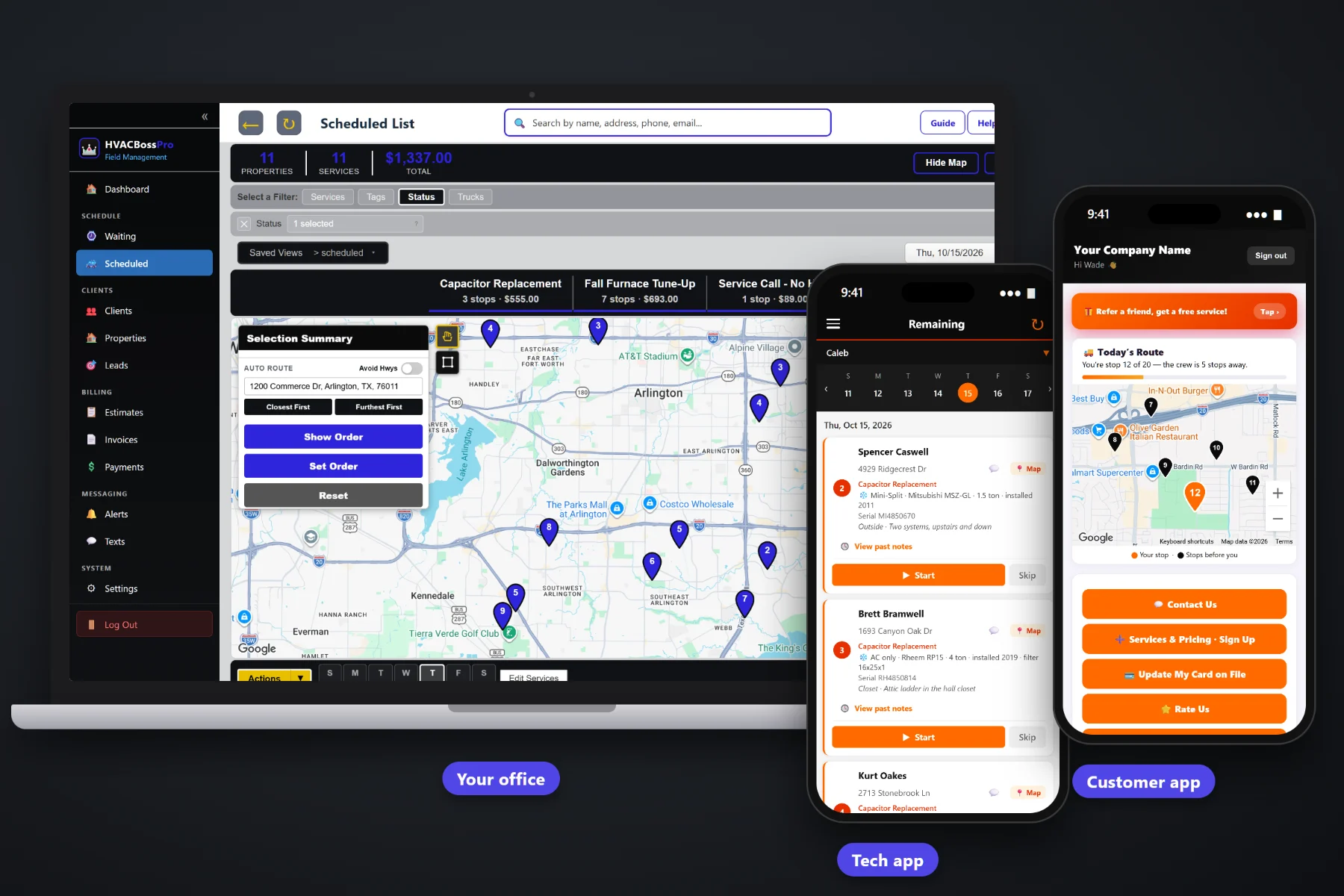
A heating and air company runs on two kinds of work: the no-cool and no-heat calls that come in all day, and the spring and fall tune-ups that keep maintenance customers loyal. HVACBossPro keeps both in one place, with the system, brand, model, serial, tonnage and filter size on every job, tune-ups that come due on their own, a dispatch board, a tech app, estimates customers approve online, two-way texting, and invoices paid by card on file.
Plans start at $59/month, and the core of the system is on every plan: equipment records, maintenance agreements, the Waiting List, dispatch, the tech app, the customer app, estimates and invoicing. You do not need a sales call or an enterprise contract to run a three-van shop properly. For the full product tour, start at HVACBossPro, then use this page and its guides to plan how your company would run on it.
System type, brand, model, serial, year installed, tonnage, filter size and unit location, entered once and shown on every visit after.
Set 180 days for spring and fall or 365 for yearly. Agreement visits land on the Waiting List on their own.
Jobs by day and van, auto-route from the shop, drag work between days. One van on repairs, one on tune-ups.
The day in route order, equipment and access notes on each card, photos, Start / Skip / Complete and a time clock.
Build the quote from your service list, the customer approves it online, and it becomes the scheduled job.
Invoices with sales tax, card on file, online payment, and one monthly statement for property managers.
Every HVAC visit starts with the same questions: what kind of system is it, how old, what size filter, and is the furnace in the attic or the closet? HVACBossPro keeps the answers on the address and shows them under it on the office lists and on the tech's phone. Enter them on the first visit and nobody has to ask again.
Small heating and air companies do not have an IT person or months to spend on an implementation. HVACBossPro is built so the owner can load customers, set up the service list and send the first van out with the tech app in the first week, on the phones the techs already carry.
Bring your list in with a CSV import. Addresses are placed on the map automatically, and each client can have many addresses.
Record the system at each address and set maintenance agreements by minimum days between visits: 180 for spring and fall, 365 for yearly.
Service calls and due tune-ups go onto the dispatch board by van and day, in route order, by hand or auto-routed from the shop.
Techs work from the phone, customers get on-the-way and arrived texts, and Complete creates the invoice and can charge the card on file.
Most field-service apps give a job an address and a notes box. An HVAC job is a system type, a model and serial, a tonnage, a filter size and a unit in an attic with a pull-down ladder. The big enterprise HVAC platforms know all that, but they are priced and built for companies with a call center.
Ask a small HVAC owner how the office really runs and you will hear the same story: a whiteboard of calls, a stack of carbon-copy tickets, a spreadsheet of maintenance customers that nobody has sorted since spring, and a tech calling from a driveway to ask what size filter that house takes. Whether the furnace is in the attic or the garage. Whether this customer is on a plan or paying for the visit.
That information belongs on the address, not on a ticket in the van door. When it shows up on the phone, any tech can run any call and the tune-ups come due without anyone digging through a spreadsheet.
HVACBossPro keeps the customer, the address, the equipment and the job in one place, from the first phone call to the paid invoice.
Every tool here exists to get more calls and tune-ups done with fewer phone calls back to the office, fewer forgotten maintenance customers and fewer unpaid invoices.
System type, brand, model, serial, year, tonnage, filter size and unit location on every address.
Recurring visits by minimum days between them. 180 days for twice a year, 365 for yearly.
Every tune-up that came due, pinned on a map and colored not due yet, due now or overdue past a 7-day grace.
Jobs by day, filtered by van, auto-routed Closest First or Furthest First from the shop. Drag work between days.
Company login plus personal PIN, calls in route order, navigation, equipment and access notes, photos and Start / Skip / Complete.
Live route map, service requests, plan sign-ups, card updates, invoices, online payment, ratings and referrals.
Built from your service list, approved online, and turned into the scheduled job. Follow-up emails go out on their own.
Website requests and maintenance plan sign-ups with card captured land in Form Responses. One click makes a client.
Text customers from the office and send automatic reminders and alerts by text and email.
Line items and sales tax, card on file, auto-charge on completion or on a schedule, and past-due follow-up.
A property manager set to Monthly gets one statement covering every rental, each line labeled with the address.
Bring your customers in from a spreadsheet. Imported addresses are placed on the map automatically.
Tag clients Maintenance Plan, Commercial or VIP, and add the custom fields your shop needs.
See the work done and the money in, by the numbers your company actually runs on.
Office user roles, employees with personal PINs, van assignments, a time clock and crew GPS on the office map.
Start $59, Pro $89 and Crew $199 per month, with a 14-day free trial and no credit card.
Service calls come in by phone, text or the website request form and go straight onto a day and a van. Maintenance agreement visits come due on their own from each plan's minimum days between visits and wait on the Waiting List map until the office schedules them. A common setup is one van on repair calls and one on tune-ups, with the tune-up van auto-routed from the shop. For the full walkthrough, read HVAC Software: The Complete Guide for Small Heating and Air Companies.
Almost every HVAC visit needs someone home: the thermostat is inside, the furnace is in the attic, and the air handler is in a closet. Reminders the night before, on-the-way and arrived texts, and a live map in the customer app tell the homeowner when to expect the van. Replies come back to the office through two-way texting. When the job is done, the invoice, online payment and card on file are waiting in the customer app.
Pick the plan that fits your shop. Every plan starts with a 14-day free trial and no credit card.
Compare plans on the pricing page.
Software that runs the office and field side of a heating and air company in one place: customers and their addresses, the equipment at each address, service calls, maintenance agreement tune-ups, dispatch, a tech app, estimates, texting, invoicing and payments. HVACBossPro does all of that for small companies running one to a handful of vans.
System type (Central AC + Furnace, Heat Pump, AC only, Furnace only, Mini-Split, Boiler or Package Unit), brand, model number, serial number, year installed, tonnage, filter size, unit location (attic, closet, garage, basement, crawlspace, roof or outside) and access notes like the attic ladder, gate code, dog or thermostat location.
Each agreement has a minimum number of days between visits, such as 180 for a spring and fall tune-up or 365 for a yearly visit. When a visit comes due it shows on the Waiting List map, colored not due yet, due now or overdue past a 7-day grace, so nobody has to track tune-ups in a spreadsheet.
No app store download. The tech app runs in the browser on iPhone and Android and can be installed to the home screen. Techs log in with your company login and a personal PIN.
Yes. One client can have many addresses, and a client set to Monthly gets one statement each month covering every rental home or building, with each line labeled with the address.
Start is $59/month, Pro is $89/month, and Crew is $199/month. Every plan starts with a 14-day free trial with no credit card.
This page covers HVAC software as a whole. For the product tour, screenshots and every feature in one place, see the full HVACBossPro platform overview.
Practical reading on equipment records, service calls and maintenance agreements, the Waiting List, dispatch, the tech and customer apps, estimates, texting, invoicing, property manager billing, importing customers, choosing software, setup and pricing.
Equipment on every job, tune-ups that come due on their own, a dispatch board, a tech app and invoices paid by card on file. Try HVACBossPro free for 14 days.