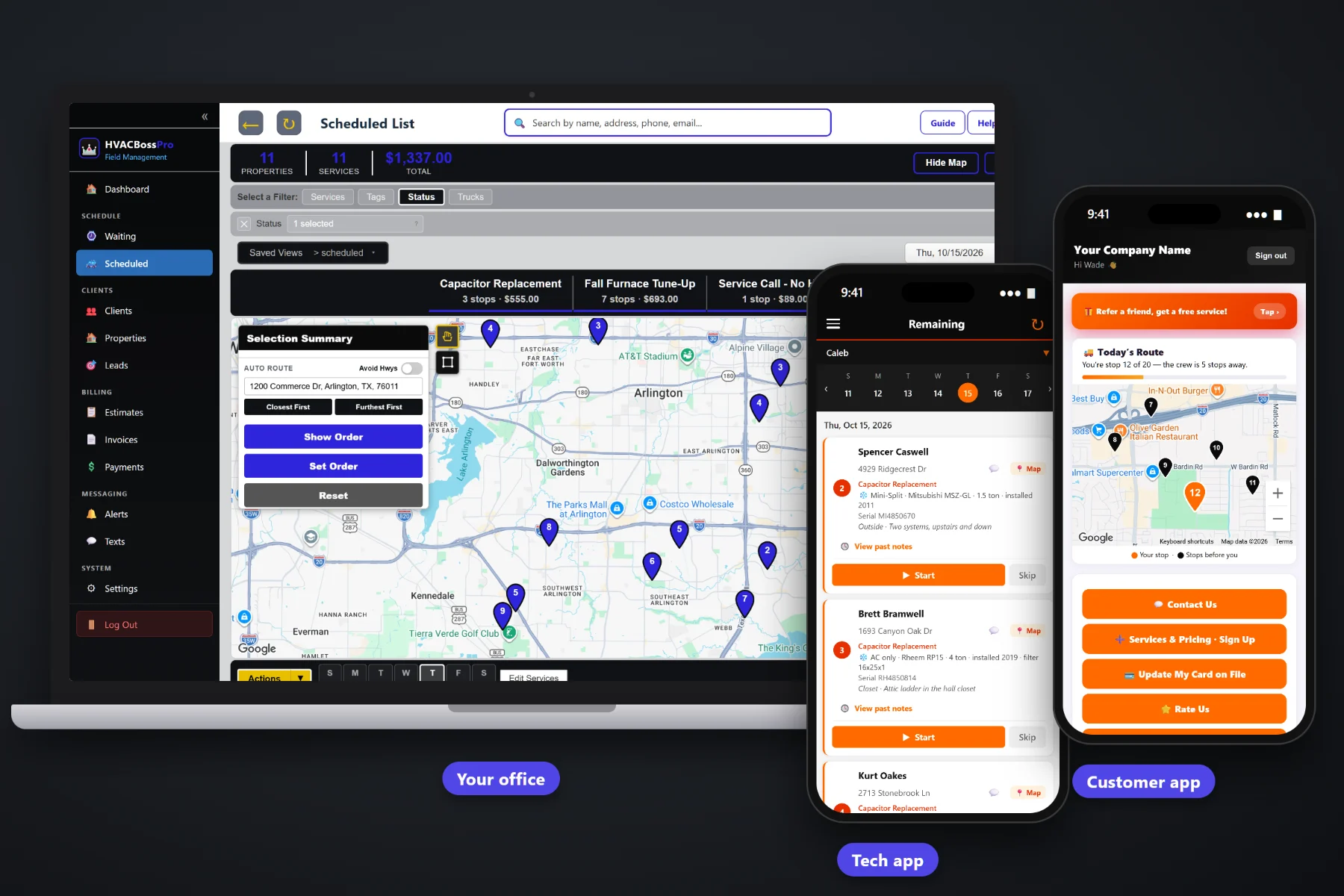
An HVAC call ends with a diagnostic, a part or two, some labor and maybe a few pounds of refrigerant. HVACBossPro turns that into an invoice with line items the homeowner can read, adds sales tax, charges the card on file when the tech taps Complete, and puts the invoice in the customer app for online payment. Property managers get one monthly statement covering every address, and past-due follow-up runs without a stack of sticky notes.
Plans start at $59/month, and invoicing and payments are part of every plan. Line items, sales tax, card on file, auto-charge, online payment and monthly statements come with the platform, not as an add-on. To see how billing ties into equipment records, maintenance agreements, dispatch and the tech app, start at HVACBossPro and then dig into billing here.
Diagnostic, capacitor, labor, refrigerant per lb. Each charge on its own line, priced from your own service list.
Captured on the sign-up form or added by the customer in the app, then used for every visit after.
The tech taps Complete, the invoice is created and the card on file can be charged before the next call.
Customers see their invoices, pay online and update their card from their phone.
A property manager set to Monthly gets one statement with every rental address labeled on its own line.
Unpaid invoices get followed up by text and email instead of sitting in a drawer.
Most billing arguments in HVAC start with a single line that says “Repair — $412.” HVACBossPro builds the invoice from your service list, so each part, each block of labor and each pound of refrigerant shows up as its own line with its own price. The customer sees what was done, the tech does not have to defend the total in the driveway, and the office does not field the call the next morning.
Plenty of HVAC owners still write invoices at the kitchen table after the last call. HVACBossPro moves that work to the moment the job is finished. The office sets up the service list once, the tech taps Complete, and the invoice exists, priced and taxed, with the card charged if there is one on file.
Diagnostic, tune-up, maintenance plan, capacitor, contactor, drain line, refrigerant per lb, blower motor, thermostat, coil cleaning, at your prices.
The sign-up form captures a card, and customers can add or update one in the customer app any time.
The invoice is created from the job, sales tax is added, and the card on file can be charged on the spot.
Open invoices sit in the customer app for online payment and get past-due reminders by text and email.
A basic invoicing tool gives you a blank line and a total. An HVAC invoice is a diagnostic, a part with a model number, labor, refrigerant by the pound, sales tax, and a customer who may be a homeowner, a landlord with six rentals or a building manager with rooftop units.
Ask any HVAC owner where the money leaks and you will hear the same story: a carbon-copy invoice that never made it back from the van, a capacitor that got installed and never billed, a landlord who gets six separate invoices and pays none of them, and a past-due list that only exists in the owner's head. The work got done. The billing did not keep up.
When the invoice is created from the job the moment the tech taps Complete, nothing waits for Friday night, and nothing slips through a hole in the clipboard.
HVACBossPro keeps the job, the equipment, the invoice and the payment on one record, from the first diagnostic to the paid statement.
Every tool here exists to get more invoices paid on the day of the work, with fewer phone calls and less time at the kitchen table.
Each part, block of labor and service on its own line, priced from your service list.
Diagnostic, tune-up, capacitor, contactor, drain line, blower motor, thermostat, coil cleaning and more, at your prices.
Set refrigerant up as a per-pound item so the quantity and price show plainly.
Sales tax is added to invoices, so the total the customer sees is the total they pay.
Captured at sign-up or added in the customer app, and used again on every visit.
Charge the card on file when the tech taps Complete, or on a schedule.
Customers see invoices in the customer app and pay from their phone.
Expired or declined card? The customer updates it in the app without reading numbers over the phone.
Reminders by text and email for invoices that are still open.
One statement a month for a property manager or business, each line labeled with its address.
Twice-a-year tune-ups come due on their own, and the visit is billed the way your plan works.
An approved estimate becomes the job, so the invoice starts from what the customer already said yes to.
Answer billing questions by text from the office, with the conversation kept with the customer.
Look at what was billed, what was paid and what is still open.
Bill customers in the US, Canada, Australia, New Zealand and the UK in their own currency.
Start $59, Pro $89 and Crew $199 per month, with billing on every plan.
A homeowner with a no-heat call wants to pay and be done. A property manager with forty rental homes wants one bill a month, not forty. HVACBossPro handles both. Set a client to Monthly and every visit to every address they own rolls onto a single statement, with each line labeled by address so their bookkeeper can match it to the right property. For a full walkthrough of HVAC billing from the first call to the month-end review, read HVAC Invoicing Software: The Complete Guide to Billing Heating and Air Jobs.
Not every customer is home when the tech finishes. A rental tenant lets the tech in, the landlord pays. A homeowner is at work while the tune-up happens in the garage. The customer app gives each of them a place to see the invoice, pay it online, keep a card on file and update that card when it expires. The same app shows the live route map on service day and lets them request service or sign up for a maintenance plan, so billing lives in an app they already open.
Pick the plan that fits your operation. Every plan starts with a 14-day free trial and no credit card.
Compare plans on the pricing page.
Line items from your own service list: a diagnostic, each part such as a capacitor or contactor, labor, refrigerant priced per pound, and anything else you set up. Sales tax is added, and the invoice shows in the customer app where it can be paid online.
Yes. When the tech taps Complete, the invoice is created and the card on file can be charged right then. You can also charge a card on file on a schedule.
The website sign-up form captures a card when a customer signs up, and customers can add or update their card in the customer app at any time, which is also how a declined or expired card gets fixed.
Set the client to Monthly and they get one statement each month covering every rental home or building they own, with each line labeled by address.
No. The software adds sales tax to invoices, but which parts and labor are taxable depends on where you work. Ask your accountant or your state or provincial tax office and set up your billing to match.
Start is $59/month, Pro is $89/month, and Crew is $199/month. Invoicing and payments are on every plan, and every plan starts with a 14-day free trial with no credit card.
Billing is one piece of how HVACBossPro runs a heating and air company. For equipment records, maintenance agreements, the Waiting List, dispatch and the tech app, see the full HVACBossPro platform overview.
Practical reading on HVAC line items, diagnostic fees, refrigerant per pound, card on file, auto-charge, deposits, declined cards, past-due follow-up, sales tax, maintenance plan billing, monthly statements, commercial accounts, callbacks, cash flow and month-end review.
Line items your customers understand, sales tax, card on file, auto-charge on completion, online payment and one monthly statement for every property manager. Try HVACBossPro free for 14 days.